

If you’re the kind of person who falls down rabbit holes about ball lightning, the Taos Hum, bioluminescent bays, or the physics behind auroras, you already know where the best material lives: YouTube. Independent researchers, university lecture channels, and documentary filmmakers have quietly built the largest open library of phenomena-focused content ever assembled. Hour-long deep dives, eyewitness interviews, conference talks — it’s all there, free.
The problem is that video is a terrible format for actually studying anything.
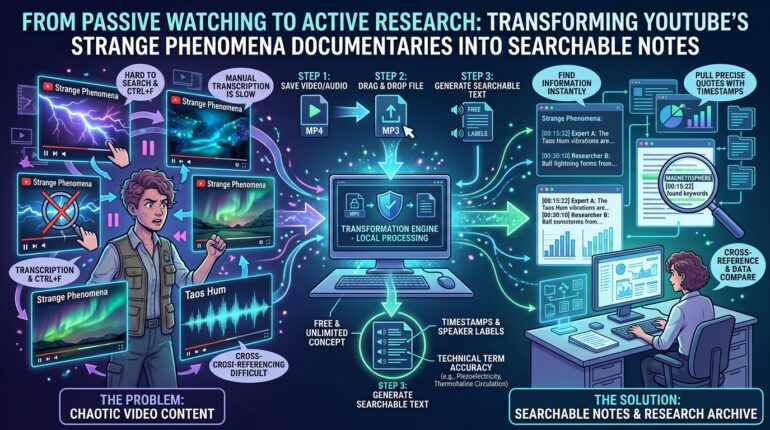
You can’t Ctrl+F a video. You can’t skim it. When you half-remember that a volcanologist said something fascinating about infrasound “somewhere around the forty-minute mark,” your only option is scrubbing back and forth through the timeline like it’s 2009. And if you write about these topics — for a blog, a research project, or a forum debate — quoting a video accurately means transcribing it by hand, one pause-and-rewind at a time.
There’s a much better way: convert the video to text and work from a transcript.
Why Transcripts Change Everything for Curious Minds
A transcript turns a two-hour documentary into a searchable document. Suddenly you can jump straight to every mention of “magnetosphere,” pull an exact quote with a timestamp, cross-reference what two different experts claimed about the same event, and build a personal archive of notes that doesn’t require rewatching anything. For anyone who treats YouTube as a research library rather than background noise, transcription is the single biggest upgrade you can make to your workflow.
The catch has always been the tools. Most online transcription services cap your free minutes, choke on long files, or require you to upload your content to someone else’s cloud. That’s where a privacy-first YouTube Transcript Generator like the one from SoundWise.ai takes a genuinely different approach.
What SoundWise.ai Does Differently
SoundWise.ai is a suite of AI transcription tools — audio to text, video to text, MP3 to text, MP4 to text — built around one unusual design decision: your files are never uploaded. The entire speech-to-text process runs locally on your own machine. For researchers handling interviews, unlisted footage, or simply anything they’d rather not hand to a cloud server, that’s a meaningful distinction, not a marketing line.
The other standout features:
- Free and unlimited. No monthly minute quotas and no file caps, which means you can transcribe an entire playlist of lectures without hitting a paywall.
- Timestamps and speaker labels. The output is a clean, properly formatted document — far easier to read and cite than YouTube’s raw auto-caption file.
- Accuracy on difficult audio. The AI handles technical vocabulary, accents, and background noise noticeably better than default auto-captions, which matters when your videos are full of terms like “piezoelectricity” and “thermohaline circulation.”
How to Use It: Three Steps
- Save the video or audio. Download the YouTube video you want to study as an MP4, or grab just the audio as an MP3 (smaller file, faster processing). Creators can pull their own uploads directly from YouTube Studio.
- Drop the file into SoundWise.ai. Drag and drop — since transcription happens locally, this works even on private or unlisted videos that link-based tools can’t touch.
- Get your editable transcript. Within moments you have a timestamped, searchable text version of the entire video, ready to annotate, quote, or export.
From Passive Watching to Active Research
Once you start transcribing YouTube videos, your relationship with the platform changes. A documentary about the Hessdalen lights becomes a source document you can quote precisely. A ten-part lecture series on atmospheric optics becomes a searchable reference text. Eyewitness interviews become data you can compare line by line instead of impressions you vaguely recall.
The world’s strangest phenomena deserve better than half-remembered viewing. Turn the videos into text, and you turn curiosity into an actual archive — one you can search, cite, and build on for years.